Procreate Manga Megapack: A Practical Toolkit for Manga and Comic Creators
If you're a digital artist, illustrator, or storyteller working on manga or comics, the Procreate Manga Megapack could be the toolkit you've been missing. It's a bundle that includes over 200 brushes tailored for manga creation, plus ready-to-use canvas and storyboard templates. Designed for Procreate 5.2 and compatible with iPad and Apple Pencil, this pack streamlines the creative process so you can focus more on storytelling and less on technical setup.
What’s Inside the Procreate Manga Megapack?
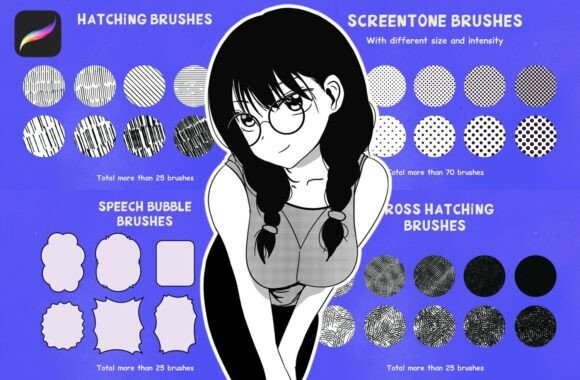
At its core, the pack is built around seven main brush categories, each serving a specific function in manga and comic illustration:
- Manga Brushes – Traditional-style brushes that mimic classic inking tools like g-pen, kabura, and maru pens.
- Real Screentone Brushes – Used to add texture and depth, similar to the screentones traditionally applied by hand in print manga.
- Real Screentone Stamp Brushes – For applying consistent dot patterns quickly, ideal for backgrounds or effects like rain or fog.
- Cross Hatching Brushes – Perfect for shading and creating realistic lighting effects with minimal effort.
- Manga Effect Brushes – Specialized brushes for dynamic effects like speed lines, explosions, and glowing lights.
- Speech Bubble Brushes – Ready-made bubble shapes that help bring dialogue to life without needing to draw them manually.
- Halftone Manga Brushes – Simulate the look of vintage printed comics, adding character and nostalgia to your work.
How Different Users Benefit from the Megapack
Whether you're a hobbyist drawing for fun, a freelance artist taking on client work, or a teacher introducing students to digital illustration, the Procreate Manga Megapack adapts to a wide range of needs.
For Independent Comic Creators
If you're self-publishing your manga or webcomic, consistency and efficiency are key. The included brushes eliminate the need to manually create textures or effects, letting you maintain a professional look across pages. The manga canvas template ensures your panels are laid out correctly from the start, saving time in the editing phase.
For Digital Artists Transitioning from Traditional Media
Many artists who started with pen and paper find digital tools like Procreate intimidating at first. The Procreate Manga Megapack bridges that gap by offering brushes that closely mimic their analog counterparts. This makes the transition smoother and allows for more creative freedom without sacrificing the feel of traditional inking.
In Educational Settings
Art instructors teaching digital illustration can use this pack to introduce students to industry-standard tools. The manga storyboard template is especially useful for planning scenes and understanding visual storytelling flow. Students can focus on learning composition, shading, and layout without getting bogged down by technical setup.
For Freelancers and Commercial Artists
When working on tight deadlines, efficiency matters. The pre-built brushes and templates let you deliver polished results faster. Whether you're creating illustrations for clients, designing merchandise, or producing content for social media, the Procreate Manga Megapack helps you maintain a consistent style and workflow.
Real-World Scenarios Where It Shines
Let’s say you're working on a short manga for a contest or web series. With the Procreate Manga Megapack, you can use the speech bubble brushes to place dialogue quickly, apply halftone brushes to simulate printed effects, and layer cross-hatching for dramatic shading—all within the same app session.
Or imagine you're a concept artist for a game or animation project. You need to create stylized characters with a manga-inspired look. The effect brushes can help you quickly add glowing eyes, motion blur, or energy bursts—elements that bring your characters to life without needing to draw every line manually.
What to Consider Before Using the Megapack
While the Procreate Manga Megapack is a powerful toolkit, it’s important to understand your own workflow before diving in. Here are a few things to think about:
- Device Compatibility – It’s designed for Procreate 5.2 and works best on iPad with Apple Pencil. If you're using a different device or software, some features may not function as intended.
- Learning Curve – While the brushes are intuitive, getting the most out of them requires some practice. Take time to experiment with pressure sensitivity, brush settings, and layer blending modes.
- Customization – Some users prefer tweaking brush settings to suit their personal style. Don’t be afraid to adjust opacity, grain, or texture settings to make the brushes your own.
When It Makes Sense to Invest
If you're creating manga or comics regularly, investing in a well-organized brush pack like this can save you hours of setup and customization. Instead of downloading individual brushes from different sources, the Procreate Manga Megapack gives you a cohesive set that works together seamlessly.
For educators or studio teams, purchasing a single pack and sharing it internally can standardize tools across multiple users, ensuring consistency in collaborative projects.
Final Thoughts
The Procreate Manga Megapack isn’t just about having more brushes—it's about having the right tools to bring your manga and comic ideas to life efficiently. Whether you're a seasoned professional or just starting out, this pack helps you streamline your process, maintain visual consistency, and stay focused on what matters most: your story.