Procreate Glitch Patterns Brush Set: Integrating Digital Distortion into Creative Workflows
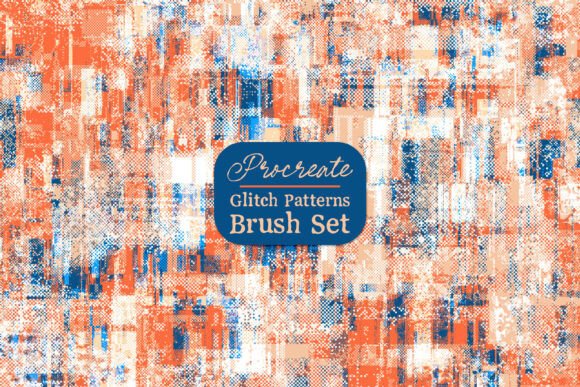
The Procreate Glitch Patterns Brush Set offers a curated collection of 8 seamless tiling brushes designed specifically for the Procreate app. These brushes bring a distinct digital aesthetic to your artwork, blending pixelated textures, fragmented lines, and abstract distortions into your creative process. Whether you're designing for print, digital media, or product-based workflows, this brush set provides a flexible and visually compelling tool for creators across disciplines.
Understanding the Glitch Aesthetic and Its Creative Role
The glitch aesthetic has evolved from a digital error into a deliberate design trend. It’s often used in graphic design, UI/UX, fashion, and even branding to convey a sense of digital disruption or futuristic energy. The Procreate Glitch Patterns Brush Set captures this essence by offering seamless, repeatable textures that can be layered, masked, or applied directly to enhance visual interest.
For digital artists, illustrators, and designers, integrating glitch effects can serve both functional and stylistic purposes. These brushes allow you to:
- Add texture overlays to digital illustrations
- Create abstract backgrounds for posters, social media visuals, or presentations
- Enhance sublimation prints with dynamic patterns
- Design wall art with a contemporary edge
Because the brushes are seamless and tileable, they can be used across large canvases without visible repetition, making them ideal for scalable projects.
How the Brush Set Fits Into a Creative Workflow
Creative workflows often involve multiple stages: ideation, drafting, refining, and finalizing. The Procreate Glitch Patterns Brush Set can be integrated at any of these stages, depending on the desired effect and project type.
Before the Project: Preparing Your Toolkit
Before starting a new illustration or design project, it’s helpful to have a set of reusable assets and tools ready. Installing the glitch brushes ahead of time ensures they’re available when inspiration strikes. You can preview each brush pattern to understand how it might function in different contexts—whether as a background texture or a focal element.
Consider organizing the brushes into a dedicated folder within Procreate’s brush library for easy access. This small step improves efficiency, especially when working under deadlines or managing multiple design directions.
During the Creative Process: Layering and Experimentation
One of the strengths of the Procreate Glitch Patterns Brush Set is its versatility during the creative process. Here’s how you can apply the brushes in real-time:
- Background Creation: Use a glitch brush at a low opacity to generate a subtle, textured base layer. This adds depth without overpowering the main subject.
- Overlay Effects: Apply a glitch pattern as a clipping mask over a character or object to simulate digital distortion or a futuristic effect.
- Color Blending: Paint glitch textures in grayscale and then colorize them using adjustment layers. This allows for flexibility in matching your project’s color scheme.
Because these brushes are designed to tile seamlessly, you can scale them across large canvases without losing visual integrity. This makes them especially useful for print-on-demand creators, mural designers, and pattern-based illustrators.
After the Design: Refinement and Export
Once the main artwork is complete, the glitch brushes can still play a role in the refinement phase. For example, you might use a glitch texture to soften edges, add a retro filter effect, or create a dynamic transition between two elements.
For digital product creators, such as those designing templates or digital assets, incorporating glitch effects can differentiate your offerings in a competitive market. It adds a layer of uniqueness that appeals to clients looking for modern, tech-inspired visuals.
Compatibility and Integration with Other Tools
The Procreate Glitch Patterns Brush Set is designed specifically for use within the Procreate app, which is widely used by digital artists and illustrators on iPad devices. However, its utility doesn’t stop there. Once exported, glitch-patterned elements can be imported into other platforms such as:
- Adobe Photoshop or Illustrator for further refinement or vector conversion
- Canva or Figma for social media or UI/UX design integration
- Print-on-demand platforms like Printful or Teespring for merchandise creation
For educators or digital content creators, these brushes can also be used to generate engaging visual aids. For example, glitch textures can be applied to infographics, course slides, or promotional banners to capture attention and reinforce a modern, tech-forward theme.
Practical Implementation Tips for Long-Term Use
While the initial installation of the brushes is straightforward, maintaining efficiency and consistency over time requires a bit of planning:
- Backup Your Brushes: Procreate allows for brush export. Save a backup copy of the glitch brush set to iCloud or another cloud service to prevent data loss.
- Label and Categorize: Rename the brushes using descriptive tags (e.g., “Glitch – Digital Fracture” or “Glitch – Pixel Grid”) to make them easier to find in large brush libraries.
- Test in Different Contexts: Apply each brush to various color schemes and layers to understand how it behaves under different lighting or blending modes.
- Document Your Workflow: If you're creating tutorials or templates, note how and where you used each glitch brush. This helps maintain consistency across projects and simplifies asset management.
Use Cases Across Industries and Creative Fields
The versatility of the Procreate Glitch Patterns Brush Set makes it a valuable tool across a wide range of creative and professional fields:
- Graphic Designers: Use glitch textures to add edge to branding materials, album covers, or event posters.
- Freelance Artists: Incorporate glitch patterns into NFT artwork or digital commissions for a modern twist.
- Merchandise Creators: Enhance t-shirt, phone case, or wall art designs with repeatable glitch motifs.
- UI/UX Designers: Apply glitch overlays to mockups or interactive prototypes to simulate futuristic interfaces.
- Educators and Content Creators: Use glitch effects to make digital lessons, infographics, or presentations more visually engaging.
Conclusion: Enhancing Creativity Through Process Integration
The Procreate Glitch Patterns Brush Set isn’t just a collection of brushes—it’s a tool for enhancing creative expression through thoughtful integration into your workflow. By understanding how and when to use each pattern, you can elevate your digital artwork, streamline your design process, and maintain a consistent visual language across projects.
Whether you're a professional illustrator, a small business owner creating branded assets, or a hobbyist experimenting with digital art, this brush set offers a practical and visually rich addition to your toolkit. The key to getting the most out of it lies in preparation, experimentation, and intentional integration into your creative process.