Cute Alphabet and Number Brush Stamp for Procreate: A Creative Tool for Digital Artists
What Is the Cute Alphabet and Number Brush Stamp?
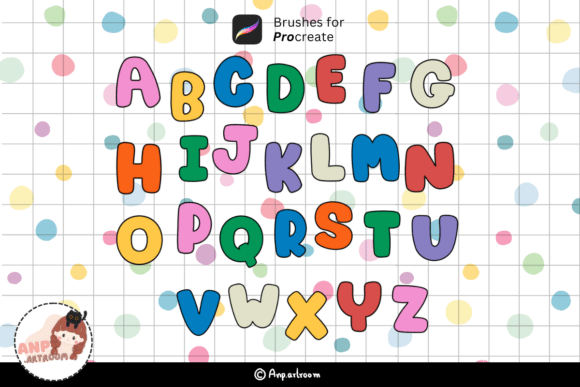
The Cute Alphabet and Number Brush Stamp is a digital brush set designed specifically for use with the Procreate app on iPad. It includes a full range of uppercase and lowercase letters, numbers from 0–9, and a selection of special characters, all rendered in a playful, brush-stroke style. This brushset allows creators to quickly add hand-lettered text elements to their digital projects without needing advanced calligraphy or typography skills.
Unlike traditional text tools, which can feel rigid and impersonal, these brushes maintain the organic texture and flow of real brush lettering. This makes them especially valuable for creators aiming to infuse their work with a personal, handcrafted touch. The set is delivered as a .brushset file within a ZIP archive, making installation straightforward for users familiar with importing brushes into Procreate.
Key Features and Design Philosophy
At its core, the Cute Alphabet and Number Brush Stamp offers a complete character set that covers most practical text needs. This includes:
- A–Z uppercase letters
- a–z lowercase letters
- Numbers 0 through 9
- Common special characters and punctuation
Each character is designed with a soft, whimsical aesthetic that complements a wide range of creative projects. The brush texture mimics real ink or brush strokes, giving text a tactile, hand-painted quality that digital fonts often lack. This design choice helps maintain visual consistency when used alongside other brush-based artwork in Procreate.
Who Benefits Most from This Brushset?
This brushset is particularly well-suited for:
- Bullet journalers who want to add cute, cohesive headers and labels without drawing each letter manually
- Graphic designers creating social media posts, digital stickers, or printable planners
- Freelance illustrators who need to integrate text into their compositions quickly
- Small business owners crafting digital marketing materials or product mockups
- Bloggers and content creators looking to enhance their visual assets in a consistent, professional way
Because it's designed for Procreate, the brushset works best for those already invested in digital illustration or planning workflows that benefit from iPad-based creation tools.
Usability and Workflow Integration
One of the standout aspects of the Cute Alphabet and Number Brush Stamp is its ease of use. Once imported into Procreate, each character can be accessed individually through the brush library. This allows for a flexible, non-linear approach to text creation, where users can stamp letters one at a time rather than typing out full words.
This method has both advantages and limitations. On the plus side, it gives creators full control over spacing, alignment, and layering. It also allows for creative variations—such as rotating letters slightly or adjusting pressure to vary stroke thickness. However, it does require more manual input than a traditional text tool, which may slow down workflows for those needing to add large blocks of text regularly.
Quality and Consistency
In terms of quality, the brushset holds up well across different brush sizes and opacity levels. The textures remain crisp and readable even when scaled down, making it suitable for detailed work like planner spreads or digital stickers. The consistency between characters is also well-maintained, with uniform weight and spacing that helps text appear cohesive rather than pieced together.
That said, the brushset does not include built-in ligatures or automatic spacing, so users will need to adjust character placement manually. While this offers more creative control, it can be a drawback for those looking for a faster, more automated solution.
Real-World Use Cases
Let’s consider a few practical applications where the Cute Alphabet and Number Brush Stamp shines:
- Custom invitation design: A freelance designer can quickly add playful, hand-lettered greetings to digital wedding or event invitations without redrawing each word.
- Monthly planner layouts: A planner creator can stamp consistent, cute headers for weekly or daily sections, maintaining a cohesive look across pages.
- Social media graphics: A small business owner can enhance Instagram stories or Pinterest pins with stylized text that aligns with their brand aesthetic.
- Digital bullet journaling: An educator or productivity blogger can create visually engaging headers and to-do lists that feel more personal than standard fonts.
Limitations and Considerations
While the Cute Alphabet and Number Brush Stamp brings a lot to the table, it’s not without its limitations. Because it’s a static brushset, it doesn’t offer dynamic text editing features—meaning once a letter is stamped, it becomes a brush stroke and cannot be edited like a text layer. This can be a hurdle for users who frequently need to revise text content.
Additionally, the brushset does not include alternative letterforms or stylistic variations. For creators who like to mix different fonts or styles within a single project, this could limit flexibility compared to using multiple brushsets or downloadable fonts.
Long-Term Value and Flexibility
For creators who regularly work in Procreate and value a hand-lettered aesthetic, the Cute Alphabet and Number Brush Stamp offers solid long-term value. It streamlines the process of adding stylized text to digital compositions, saving time and reducing the learning curve associated with hand-drawn lettering.
Its flexibility lies in its simplicity. While it doesn’t offer complex features like kerning or ligatures, it gives users the freedom to customize each letter independently. This makes it a versatile option for projects that benefit from a more organic, less polished look—such as children’s illustrations, casual branding, or personal journaling.
Final Thoughts and Recommendations
The Cute Alphabet and Number Brush Stamp is a practical, beginner-friendly tool that fills a specific niche in the digital art and design space. It’s especially valuable for creators who want to maintain a consistent visual style across their text and illustrations without investing time in learning advanced lettering techniques.
If you're already using Procreate and find yourself frequently adding text elements to your work, this brushset can be a worthwhile addition to your toolkit. It won’t replace a full typography suite, but it can significantly enhance your creative workflow by making text integration faster and more visually cohesive.
However, if your projects require frequent text edits, multilingual support, or a variety of font styles, you may want to explore additional brushsets or hybrid solutions that combine static brushes with Procreate’s built-in text tools.