Procreate Brush Stamp Work Space
Unlock Creative Freedom with Custom Doodle Brushes
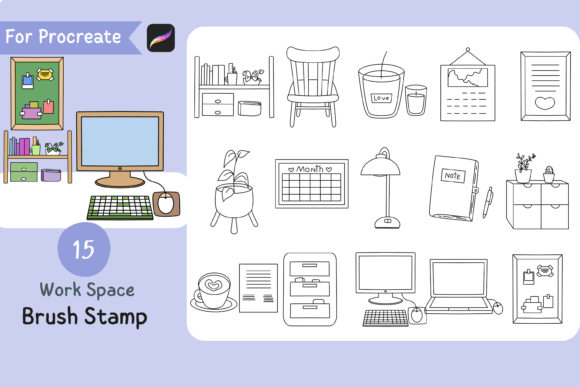
For digital artists, illustrators, and content creators, workspace personalization plays a key role in both inspiration and efficiency. The Procreate Brush Stamp Work Space set offers a unique way to infuse personality into your digital canvas without compromising flexibility. With 15 handdrawn doodle brushes featuring transparent backgrounds, this brushset empowers users to layer, color, and texture freely—making it an essential tool for a wide range of creative and professional applications.
What Makes These Brushes Stand Out?
Each brush in the Procreate Brush Stamp Work Space collection is handdrawn, giving your work a natural, organic feel. The transparent background allows for seamless integration with any color palette or design scheme. Whether you're creating social media assets, digital planners, or branded illustrations, these brushes adapt effortlessly to your vision.
Unlike rigid clipart or pre-colored graphics, these brushes offer full customization. You can:
- Add your own color fills
- Apply textures or gradients
- Layer with other brushes or assets
- Mix with typography or patterns
Practical Applications Across Industries
The versatility of the Procreate Brush Stamp Work Space makes it valuable across multiple fields. Here’s how different professionals can benefit from integrating these brushes into their workflow:
Graphic Designers & Illustrators
These brushes act as a quick-start toolkit for visual storytelling. Whether you're designing a book layout or crafting a digital magazine cover, the doodle brushes help add visual interest without overwhelming the composition. They’re also ideal for adding subtle background elements or border accents that enhance the overall aesthetic without pulling focus.
Content Creators & Marketers
For those producing digital content—especially on platforms like Instagram, Pinterest, or TikTok—visual consistency and charm matter. Use these brushes to create custom stickers, infographic icons, or branded headers. Because they’re transparent and customizable, they fit seamlessly into templates and recurring content themes.
Educators & E-learning Designers
Engagement in educational materials can be significantly improved with visual cues and illustrations. These doodle brushes are perfect for designing interactive worksheets, lesson highlights, or motivational banners. They provide a playful, approachable tone that works especially well for younger audiences or creative learning environments.
Entrepreneurs & Small Business Owners
If you're building a brand from the ground up, having a toolkit that supports consistent visual branding is invaluable. Use the brushes to create branded digital assets like social media posts, product mockups, or printable marketing materials. Their handdrawn style adds a personal touch that helps differentiate your brand in a digital-first marketplace.
How to Get the Most Out of Your Brushset
While the Procreate Brush Stamp Work Space is user-friendly, understanding a few key tips can enhance your experience:
- Organize your brushes within Procreate by creating a dedicated folder for quick access.
- Experiment with layer blending modes to integrate doodles with textures, gradients, or watercolor brushes.
- Resize and rotate stamps for variety without losing clarity—ideal for creating pattern repeats or dynamic layouts.
- Pair with Procreate’s built-in tools like the selection tool or alpha lock for advanced customization.
Real-World Examples of Use
Here are a few realistic scenarios where these brushes can make a difference:
- Creating a digital bullet journal: Use doodles as decorative dividers, habit trackers, or mood icons.
- Designing a workshop handout: Add visual cues like arrows, thought bubbles, or emphasis boxes to highlight key points.
- Developing a Shopify product page mockup: Enhance the layout with custom icons or illustrated features that align with your brand voice.
- Building a podcast cover: Layer doodles with typography and background textures for a unique, handcrafted look.
Choosing the Right Brushset for Your Needs
When evaluating brushsets like the Procreate Brush Stamp Work Space, consider the following factors:
- Purpose: Will these brushes support your primary use case? Are they versatile enough for different projects?
- Customizability: Do they allow for color changes, texture overlays, and layering? Transparency is key for flexibility.
- Quality: Handdrawn brushes should feel organic and not pixelated at any size.
- Compatibility: Ensure the .brushset file is compatible with your version of Procreate and device.
Installation & Setup
Getting started is simple. Once you've downloaded the zip file, follow these steps:
- Unzip the file on your device.
- Open Procreate and go to the Brushes panel.
- Tap the '+' icon and select 'Import Brush.'
- Locate the .brushset file and import it into your library.
You’re now ready to start stamping, coloring, and customizing.
Final Thoughts
The Procreate Brush Stamp Work Space is more than just a set of doodle brushes—it's a creative toolkit that adapts to your style and needs. Whether you're a professional illustrator or a weekend hobbyist, these brushes offer a practical, flexible way to add charm and personality to your work. With transparent backgrounds, handdrawn authenticity, and easy integration into Procreate, they’re a smart investment for anyone looking to streamline their creative process while keeping their visuals fresh and engaging.