Birthday Party: Creative Procreate Stamp Brushes
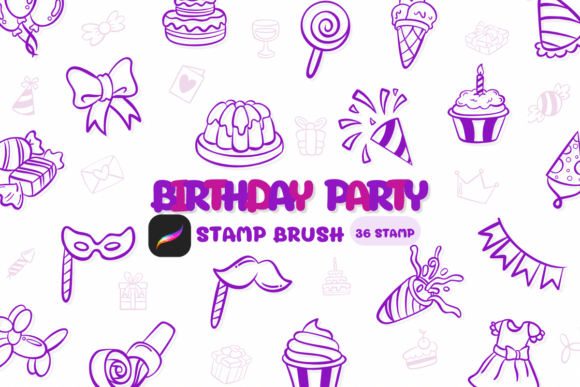
Whether you're designing a wedding invitation or crafting personalized greeting cards, the right tools can elevate your creative work. Birthday Party is a set of Procreate stamp brushes designed with a sketch-style aesthetic that blends playfulness with professional versatility. These brushes bring a hand-drawn charm to digital illustrations, making them ideal for creators who want to add personality without sacrificing precision.
What Makes Birthday Party Unique
Unlike generic brush sets, Birthday Party offers a cohesive yet flexible toolkit tailored for both digital and print-based creative work. Each brush mimics the texture and flow of real pencil or ink strokes, giving your designs a tactile, organic feel. Whether you're illustrating party banners, decorative borders, or whimsical icons, these brushes help maintain a consistent visual language across your projects.
What sets them apart is their adaptability. You can layer them, adjust opacity, or combine them with other brush styles to create depth and dimension. This makes Birthday Party a valuable asset for designers, crafters, and small business owners looking to produce polished, custom visuals with minimal effort.
Creative Applications for Birthday Party Brushes
The uses for these brushes extend far beyond birthday cards. Here are a few creative directions to explore:
- Wedding Invitations: Add a soft, hand-drawn border or floral accents to your digital invites.
- DIY Crafts: Use the brushes to design printable stencils for handmade cards, gift tags, or wall art.
- Logos & Branding: Infuse personality into a small business logo with a sketch-style icon or emblem.
- Decorations: Create custom banners, cupcake toppers, or table numbers for events.
- Journaling & Planners: Enhance your digital bullet journals with doodles, dividers, and icons.
Because the brushes are built for Procreate, you can easily scale, recolor, and reposition elements within your artwork, ensuring your designs remain clean and professional while still feeling personal.
Designing for Different Audiences
One of the strengths of Birthday Party is its ability to adapt to different tones and themes. For example, a children’s party invitation can use bold, playful strokes, while a bridal shower design might lean into softer, more elegant lines. Understanding your audience helps determine how to apply the brushes effectively:
- Young Kids: Use exaggerated shapes, bright colors, and playful compositions.
- Teens & Young Adults: Focus on modern, minimalist sketch styles with clean layouts.
- Professionals: Incorporate subtle textures and refined illustrations for branding or marketing materials.
By adjusting stroke pressure, color palette, and layout density, you can tailor the same brush set to suit vastly different audiences and purposes.
How to Maximize Visual Clarity
While the sketch-style aesthetic of Birthday Party is charming, it's important to maintain clarity in your designs. Too many overlapping strokes or inconsistent textures can make your artwork feel cluttered. Here are some practical tips:
- Limit Layers: Use only as many brush layers as needed to avoid visual noise.
- Balance Texture: Pair sketch-style elements with clean typography and flat backgrounds.
- Use Contrast: Highlight key design elements with contrasting colors or bold outlines.
- Test at Scale: Always preview your work at actual print or screen size to ensure readability.
These strategies help maintain a professional finish while preserving the handcrafted charm that makes the brushes special.
Integrating with Other Tools and Platforms
Procreate is a powerful digital illustration tool, but your work often needs to move beyond the app. The Birthday Party brushes are compatible with most design workflows, allowing you to export your creations and use them in:
- Adobe Photoshop & Illustrator: For further refinement or print production.
- Canva & Figma: Ideal for quick social media graphics or digital marketing assets.
- Print-on-Demand Platforms: Use your designs on mugs, t-shirts, notebooks, and more.
Exporting in high resolution and organizing your layers ensures your brush-based illustrations remain editable and scalable across platforms.
Staying Inspired and Original
Using the same brush set repeatedly can lead to design fatigue. To keep your work fresh, try these creative strategies:
- Combine Styles: Mix Birthday Party brushes with other Procreate tools for hybrid effects.
- Experiment with Color: Apply different color palettes to the same sketch elements to shift the mood.
- Customize Stamps: Modify brush settings to create variations in line weight and texture.
- Draw From Life: Use real-world textures and patterns as inspiration for new compositions.
By treating the brushes as a starting point rather than a template, you open up new creative possibilities and maintain a unique visual voice.
Who Should Use Birthday Party Brushes
These brushes are especially useful for:
- Freelance Designers: Speed up client work with pre-built, customizable elements.
- Small Business Owners: Create branded visuals for social media, packaging, or promotional materials.
- Educators: Design engaging classroom visuals or printable learning aids.
- Hobbyists: Bring a professional touch to personal crafting and DIY projects.
Whether you're creating for a client, your brand, or personal joy, Birthday Party offers a flexible, expressive toolkit that supports a wide range of creative goals.