3D Geometry Shape: Elevate Your Creative Projects with Procreate Stamp Brushes
For digital artists and crafters looking to infuse their work with a touch of modern charm, the 3D Geometry Shape set of Procreate stamp brushes offers a versatile and artistic solution. These brushes are designed with a unique sketch-style aesthetic, making them ideal for a wide range of creative endeavors—from wedding invitations to logo design and beyond.
What Makes 3D Geometry Shape Stand Out?
The 3D Geometry Shape brush set is more than just a collection of stamps; it’s a toolkit for visual storytelling. Each brush is crafted to mimic the look of hand-drawn sketches, giving your digital creations a tactile, organic feel. Unlike rigid vector shapes, these brushes retain a subtle imperfection that adds warmth and personality to your designs.
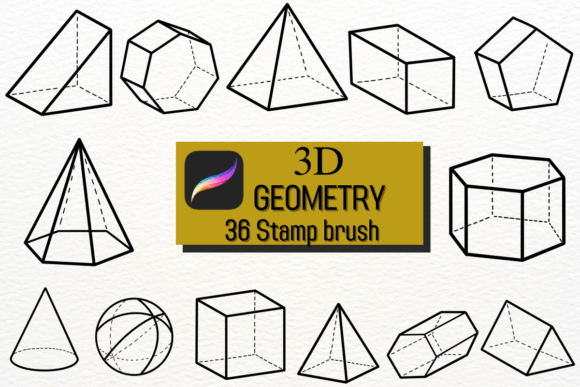
Available in a variety of geometric forms—cubes, pyramids, cones, and more—these brushes allow for layering, shading, and depth, enabling you to build dimensionality with ease. Whether you're working on a minimalist logo or a complex illustration, the 3D Geometry Shape set provides the flexibility to experiment and refine your vision.
How to Use 3D Geometry Shape in Your Workflow
One of the biggest advantages of using the 3D Geometry Shape brushes is their seamless integration into modern digital workflows. Whether you're a seasoned Procreate user or just starting out, these brushes are intuitive and easy to customize. Here are a few practical ways to incorporate them into your creative process:
- Wedding Invitations: Add a modern geometric border or background element to your designs using layered shapes that give depth without overwhelming the layout.
- Logo Design: Use the 3D elements to create stylized icons or lettering that stands out while maintaining a clean, professional look.
- Handmade Crafts: Repurpose digital sketches as printable templates for paper crafts, greeting cards, or wall art.
- Decor & Branding: Incorporate geometric motifs into packaging, social media templates, or interior design mockups for a contemporary edge.
Because the brushes are pressure-sensitive, you can control opacity and stroke intensity, allowing for subtle shading and detailed textures. This makes them perfect for artists who want to blend digital precision with a handcrafted feel.
Why Artists Love the 3D Geometry Shape Set
Many digital artists find themselves torn between the crispness of vector graphics and the warmth of traditional sketching. The 3D Geometry Shape brushes bridge that gap by combining the best of both worlds. Here’s what users are saying:
- Versatility: From flat design to complex 3D illustrations, these brushes adapt to your style.
- Time-Saving: Stamp-based brushes speed up the creation process without sacrificing creativity.
- Customizable: You can resize, rotate, and layer stamps to build intricate compositions quickly.
- Unique Aesthetic: The sketch-style finish gives a humanized, less digital look to your work.
Applications Beyond the Studio
While the 3D Geometry Shape brushes are a hit among illustrators and designers, their usefulness extends into other creative fields. Educators, for instance, can use them to create engaging visual aids for geometry lessons. Crafters can integrate them into printable DIY kits or SVG files for laser cutting and Cricut projects.
Even in lifestyle content creation, such as social media graphics or digital planners, these brushes add a subtle design flair that elevates the overall aesthetic. Their sketch-like texture works well with neutral color palettes and minimalist themes, making them a go-to resource for creators across niches.
Choosing the Right Style for Your Project
When selecting brushes from the 3D Geometry Shape collection, it’s important to consider the tone and purpose of your project. For example:
- A soft-edged cube brush might work best for a whimsical children’s book illustration.
- A sharp pyramid stamp could add structure to a tech-themed logo or infographic.
- A layered sphere set might be perfect for creating abstract backgrounds or celestial-themed art.
Take time to experiment with blending modes and opacity settings to get the exact look you want. Many artists recommend duplicating layers and applying different brush effects to achieve a multi-dimensional feel.
Maximizing the Potential of 3D Geometry Shape
One of the most exciting aspects of the 3D Geometry Shape brushes is how they encourage creative experimentation. Here are a few tips to get the most out of your set:
- Combine with other brushes: Layer the geometry stamps with watercolor or pencil brushes for mixed-media effects.
- Create seamless patterns: Use repeated shapes to design backgrounds or borders that feel both modern and organic.
- Add texture: Use the brushes as a base and overlay with scanned paper textures or ink effects for a tactile finish.
- Animate your work: If you’re into motion design, export your Procreate layers and animate the 3D shapes for social media or presentations.
Final Thoughts on 3D Geometry Shape
The 3D Geometry Shape brush set is more than just a digital tool—it's a creative companion that enhances your ability to express ideas visually. Whether you're designing a logo, crafting a handmade card, or illustrating a concept, these brushes offer a blend of flexibility and style that’s hard to match.
As digital art continues to evolve, tools like 3D Geometry Shape help artists maintain a personal touch in an increasingly streamlined workflow. By embracing both structure and spontaneity, they empower creators to push boundaries and explore new visual territories with confidence.