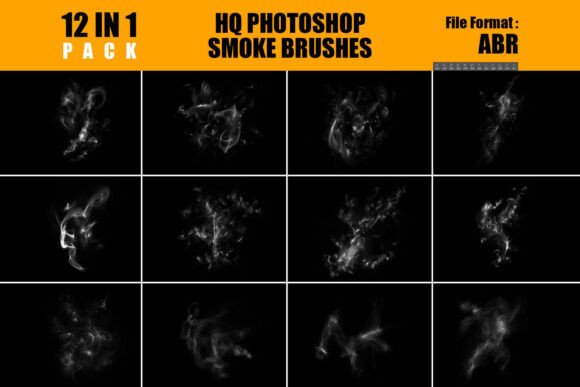
Enhance Your Art with Photoshop Smoke Brush Pack
What Is the Photoshop Smoke Brush Pack?
The Photoshop Smoke Brush Pack is a versatile set of 12 high-quality brushes designed to bring realistic, dynamic smoke effects into your digital artwork. Each brush offers unique, swirling textures that blend seamlessly into projects like digital paintings, photo manipulations, and surreal compositions. With just a drag-and-drop installation, users can quickly access high-resolution smoke effects compatible with Adobe Photoshop CS6 and newer versions.
These brushes are especially useful for adding atmospheric depth and visual intrigue. Whether you're creating a dramatic poster, enhancing a portrait, or designing a fantasy scene, the Photoshop Smoke Brush Pack gives you the tools to elevate your visuals without complex layering or time-consuming edits.
Why It Matters for Different Users
Depending on your background and goals, the Photoshop Smoke Brush Pack can serve a variety of purposes. Here’s how different users might find value in it:
- Beginners appreciate the ease of use and instant visual impact, helping them create professional-looking effects without mastering advanced techniques.
- Freelance designers can integrate the brushes into client projects quickly, adding depth and mood without spending extra time on custom effects.
- Photographers may use the brushes to enhance portraits or create surreal composites with minimal effort.
- Artists and illustrators enjoy the flexibility of blending smoke textures into digital paintings or mixed-media pieces for a more dynamic look.
- Marketers and content creators find the brushes useful for crafting attention-grabbing visuals for social media, ads, or promotional materials.
How to Use the Photoshop Smoke Brush Pack
Using the Photoshop Smoke Brush Pack is straightforward. Once you’ve downloaded the ABR file, simply load it into Photoshop and start painting. Here are some practical ways to incorporate the brushes into your workflow:
- Digital Painting: Add atmospheric depth to fantasy scenes or character illustrations by layering smoke around figures or backgrounds.
- Photo Manipulation: Blend smoke textures into portraits or landscapes to create mystery or drama. For example, overlaying a soft smoke brush on the edges of a photo can give it a cinematic feel.
- Poster Design: Use the brushes to create dramatic transitions or background textures that enhance typography and visual hierarchy.
- Surreal Art: Combine multiple smoke brushes with other elements to build dreamlike environments or abstract compositions.
- UI/UX Design: Integrate subtle smoke effects into interface elements for a polished, cinematic transition or hover effect.
Considerations for Different Priorities
When evaluating the Photoshop Smoke Brush Pack, different users may focus on different aspects based on their needs:
- Beginners may prioritize ease of use and immediate results. The drag-and-drop installation and intuitive application make this pack a great starting point.
- Professionals might care more about quality, flexibility, and compatibility with their existing workflow. The high-resolution textures and adaptability across multiple design fields meet these needs.
- Educators could use the brushes as a teaching tool to demonstrate layer blending, texture integration, or non-destructive editing techniques.
- Small business owners and bloggers may value the commercial usefulness and presentation quality—helping them create polished visuals without hiring a designer.
- Hobbyists enjoy the creative freedom the brushes offer, letting them experiment with different styles and effects in personal projects.
Is the Photoshop Smoke Brush Pack Right for You?
If you're looking for a way to add atmospheric depth and visual interest to your Photoshop work without spending hours on custom effects, this brush pack could be a great fit. It’s especially useful if you:
- Create digital art, photo composites, or surreal designs regularly.
- Need high-quality textures that blend well with different lighting and color schemes.
- Want to streamline your workflow with tools that are easy to install and use.
- Work across different design fields and need versatile effects that adapt to various projects.
However, if you're already comfortable creating custom smoke effects from scratch or prefer full control over every detail, you might find the brushes helpful but not essential. Still, having them in your toolkit can save time and inspire new creative directions.
Final Thoughts
The Photoshop Smoke Brush Pack is more than just a set of brushes—it’s a practical tool that brings professional-grade effects within reach for a wide range of users. Whether you're just starting out or have years of experience, the pack offers flexibility, quality, and ease of use that can enhance your creative process and final results.